Repair Shop Management
Made Simple
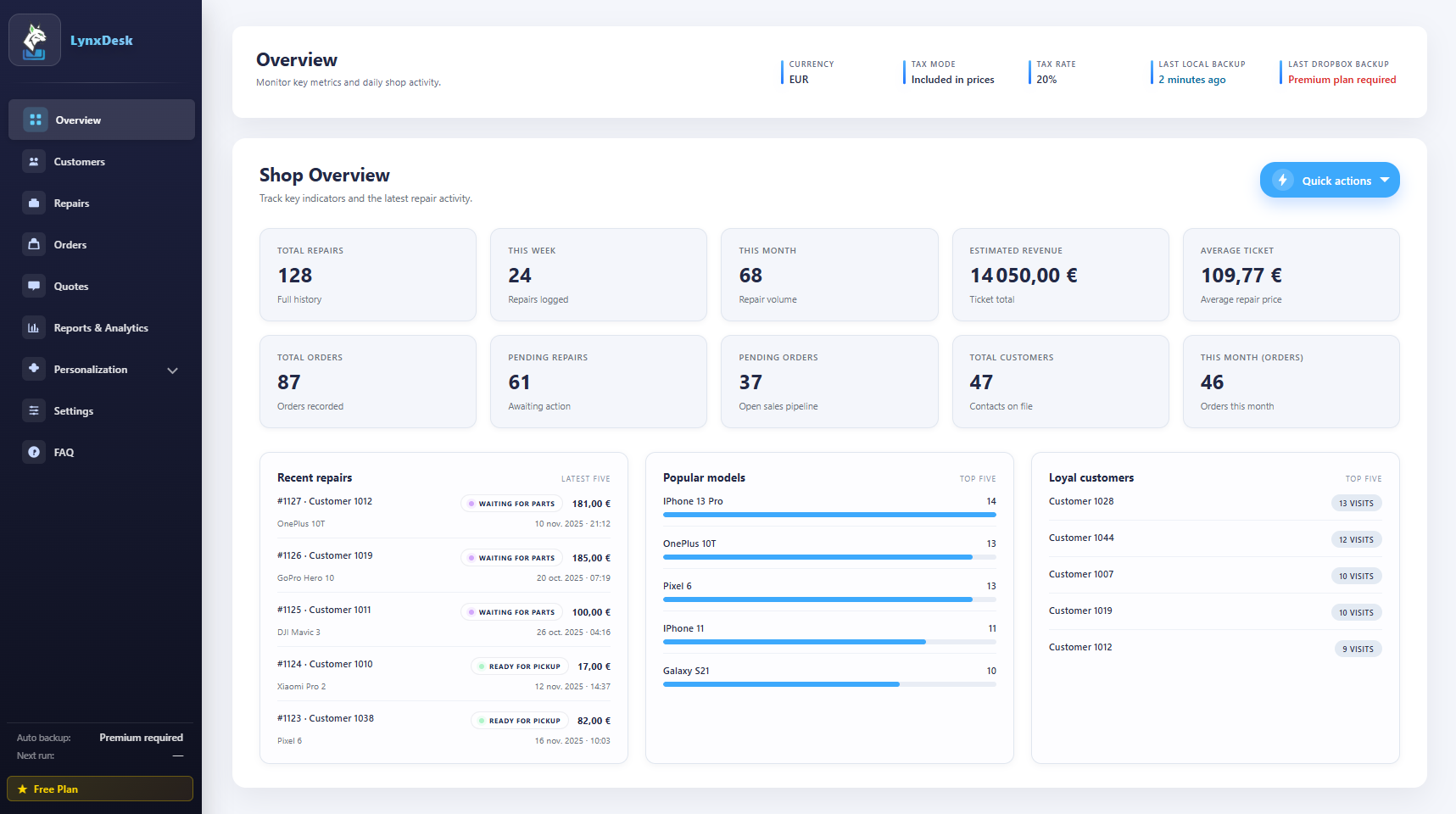
A powerful, offline-first Chrome extension for managing repairs, orders, quotes, and customers. No subscriptions, no servers—just seamless shop management in your browser.
Everything you need for daily shop operations in one integrated system
Quick customer search with autocomplete. Store contact details, repair history, and notes. See all past tickets at a glance.
Create detailed repair tickets with device info, issues, photos, and status tracking. Update progress from intake to completion.
Works completely offline. All data stored locally in your browser—no cloud required, no monthly fees.
Generate professional quotes for approval. Convert approved quotes to orders. Track sales and service orders separately.
Print clean invoices, receipts, and repair tickets. Customize templates with your logo. Export to PDF for digital delivery.
View revenue reports, repair statistics, and business insights. Filter by date range. Track performance over time.
Whether you fix phones, computers, bikes, or anything else—LynxDesk adapts to your workflow
Track screen replacements, battery swaps, water damage repairs, and software issues with photo documentation.
Manage hardware upgrades, OS installations, virus removal, and component replacements for desktop and laptop repairs.
Handle watch repairs, battery replacements, resizing, cleaning, and custom jewelry work with detailed notes.
Track propeller replacements, motor repairs, camera fixes, and calibration services for drones and RC equipment.
Organize tune-ups, brake repairs, tire replacements, and electric scooter battery services with customer history.
Manage refrigerator, washer, dryer, and small appliance repairs with parts tracking and warranty documentation.
Log controller repairs, disc drive replacements, HDMI port fixes, and software troubleshooting for all gaming systems.
Track speaker repairs, headphone fixes, camera servicing, and professional A/V equipment maintenance.
These highlights come straight from the shipped controllers, services, and print modules.
From installation to your first repair ticket—ready in minutes, not hours.
Add LynxDesk to Chrome from the Web Store with one click. No registration or configuration required.
Set your business name, currency, and repair categories. Everything works offline from day one.
Add a customer, create a repair ticket, and start managing your workflow immediately.
Start free with all essential features. Upgrade to Premium for cloud backup and advanced capabilities.
Perfect for small shops and individual repair technicians
For shops that need cloud backup and advanced features
Real tools for real repair shops—no fluff, just what works.
As a mobile repair technician, I was frustrated with bloated, overcomplicated shop management software. I needed something fast and simple—a tool that actually fit my workflow.
So I built LynxDesk. Every feature comes from real shop experience: quick customer search, streamlined ticket creation, print-ready invoices. No subscriptions, no heavy setup, no unnecessary features. Just the essentials that keep your shop running smoothly.
Former repair technician turned software developer, committed to building tools that make your job easier, not harder.
Join repair shops already using LynxDesk to manage their daily operations
Get Started FreeEverything you need to know about LynxDesk
Yes! All core features in the Chrome extension are completely free forever. Create unlimited repair tickets, manage customers, and use the full offline system without any subscription. Premium features like Dropbox backup, advanced reports, and cloud sync are optional add-ons.
Absolutely. LynxDesk stores all your data locally on your device, so you can work without an internet connection. Your tickets, customers, and inventory are always accessible, even when offline. Premium users only need internet occasionally for license validation checks.
Yes. All repair shop data in the extension is stored locally in your browser using IndexedDB and never sent to our servers. Your information only leaves your device if you enable optional Dropbox backup (Premium feature), which syncs directly to your own Dropbox account. Our website uses anonymized Google Analytics only to understand how visitors use lynxdesk.com.
No, each Premium license is valid for one device only. The free version stores data locally on each device independently. Premium includes Dropbox backup for manual data transfer between devices, but the license itself is single-device and cannot run simultaneously on multiple devices.
LynxDesk works on any Chromium-based browser: Google Chrome, Microsoft Edge, Brave, Opera, and more. It's a Chrome extension that runs directly in your browser.
You can upgrade to Premium directly from the extension settings. Premium is billed annually and unlocks Dropbox auto-backup, multi-device sync, advanced reports & analytics, and priority support.
Yes! You can export all your data as backup files anytime from the settings page. Premium users also get CSV export and Dropbox backup, so you always have a copy of your repair tickets, customers, and business information.
Yes. If you're not satisfied with Premium, contact us within 14 days for a full refund. No questions asked.